Tag: featured

  • USF Digital Network

    USF Digital Network

    The University of South Florida Digital Network will showcase video content created by students, staff and faculty on usf.edu.
    why digital network.jpg

    The purpose of the digital network is to:

    • Create and share content made by students for students in one location
    • Celebrate accomplishments by students and employees across USF
    • Develop new curriculum to increase real-world training for students with innovative digital media technology
    • Create revenue opportunities to reinvest in student success
    • Recruit new students by showing what the university has to offer
    • Break down silos and increase campus engagement

    cooperation gfx digital network

    USF Digital Network Website Mockup

    This is an example of what the USF Digital Network website can look like.

    tablet-homepage.png

    Proposed Channels

    Featured Video
    The Featured Video section can house creative, trending, and important videos like President Genshaft’s fall address.

    Explore Tampa Bay
    The Explore Tampa Bay page will feature off-campus locations. Videos will include local beaches, attractions, parks, shops, etc. This can serve as a great resource for students to discover fun things to do in the Bay Area.

    Intercollegiate Athletics
    The Sports page will house videos about sports and include a push to the USF Athletics Bullsvision page. The Sports page will eventually also include live streams of USF sporting events.

    Student Documentaries
    The Student Documentaries page will include 5- to 30-minute videos created by students on topics they’re passionate about. Projects can come from mass communications classes like Electronic Field Production, TV Production and Direction, and Documentary Film Production.

    Health & Fitness
    The Health and Fitness page will house videos from USF Health and any other health and fitness related videos. There should also be a link pushing to USF Health on this page.

    Events & Entertainment
    The Events and Entertainment page will feature USF arts and performances like dance, theater and music. This page can house videos of the University Lecture Series and videos from the USF Sun Dome like graduations.

    Florida Focus News
    The Florida Focus News page will include news briefs produced by USF students in the Florida Focus class. The local news briefs will be uploaded Monday-Friday during fall and spring semesters.

    News in 90
    The News in 90 channel will include 90-second news videos created by students for USF Housing about campus news and events.

    USF Stories
    The USF Stories page will house short videos that could feature USF students, staff and faculty. Videos can come from mass communications classes like Broadcast News, TV News and Electronic Field Production. Innovative Education is also producing content that would be great in this channel.

    Community Stories
    The Community Stories page will include feature stories in the form of interviews with members of the Tampa Bay community. The stories can be about local heroes, entrepreneurs, business owners, inspiring people making a positive change in our area, etc.

    USF Campus Tours
    The USF Campus Tour page will take students and future students on tours through campus. Videos will also show behind the scenes of USF’s TV studios, Bulls Radio, and the Oracle newspaper. Videos can showcase the USF Library Media Commons, Innovative Education, engineering, etc.

    TEDx USF
    The TEDx USF page will house TED Talks from USF campus. The USF Center for Leadership and Civic Engagement posts talks on their YouTube page. 

    Education Abroad
    USF World and Innovative Education created several videos to inform students of education abroad opportunities. Students and teachers also have videos of their study abroad experiences.

    Food
    The food channel will include cooking segments and food-themed videos like farmers markets. 

    Finance
    The Your Money & Business page will house videos that will help USF students manage their finances and save money. The USF Muma College of Business YouTube page has several interviews with business leaders like Jeff Vinik and professor lectures. 

    You can see examples of some of the videos here.

    path-to-preeminence-gfx

    Preeminence: Key Questions To Ask Ourselves

    1. Are we regarded as the national model? If not, what do we need to do differently? We have the opportunity to be the national standard if we invest in digital media technology.
    2. Are we following best practices and making smart decisions? With this digital network, we will establish the best practices in new technology. We will invest in new technology to arm our students with the tools to succeed. We will build the network in such a way that we can continue to grow and adjust.
    3. Are we surrounding ourselves with A-level players and A-level team members? Are we recruiting, hiring and retaining the very best? By committing to a digital network we will attract A-level students and faculty from across the nation. We will raise the bar for our students and our faculty.
    4. Do we create an atmosphere where everyone feels valued and empowered? Where can we hold each other accountable for going above and beyond? Offering students the digital network will empower students to tell their own stories on a platform they help create, which will prepare them to thrive when they enter the workforce. Students will be inspired to hold themselves and each other accountable by showcasing their work.
    5. What is not contributing to our goal of preeminence? What is holding us back? Silos are holding us back. The Digital Network will bridge our departments and boost school spirit. We aren’t recruiting the best students because we’re not providing the most cutting-edge learning opportunities.

    3 step launch plan green.jpg

    USF Digital Network Goals

    • Integrate curriculum with content creation
    • More content made by students for students
    • Increased exposure for USF experts
    • Fiber lines and control room for live events
    • Power 5 eligibility for significant funding increase

     Launch Plan Year 1:

    • The USF web team will build a page on the usf.edu content management system that integrates with the MyUSF app.
    • We will curate and embed existing content housed on USF YouTube Channels.
    • Several courses in the mass communications department will create new content specifically for the digital network.
    • Videos will be embedded into channels via an official USF YouTube channel.
    • We will distribute guidelines and style guides for video quality, branding consistency, and publishing workflows.
    • We will inform all content creators of video release and FERPA requirements.
    • We will launch customizable push notifications.

    Launch Plan Year 2:

    • The digital network committee will meet with several app developers to get quotes for building the network on an app.
    • We will develop a plan for live streaming.
    • We will build up to a regularly live streaming network in areas like athletics, graduations, homecoming, etc.
    • We will set up plans for sporting event paywalls.
    • We will post digital ads and create sponsored content opportunities.

    Launch Plan Year 3:

    • We plan to complete fiber installations and control room upgrades so we can technically be equipped to broadcast intercollegiate athletic events.
    • We plan to launch sports broadcasting curriculum and train students to run cameras and direct live athletics events.

    Launch Plan Year 4:

    • We plan to upgrade the WUSF studio, lighting grid and cameras for commercial production.
    • We plan to streamline curriculum so USF students can create high-quality video production in an up-to-date production facility.

    Pros of Creating Digital Network in House 

    • CMS integrates with MyUSF app
    • Simultaneous website and app launch
    • Customizable push notifications
    • YouTube embeds instead of storage
    • Embed workflow is more efficient

    Cons of Creating Digital Network in House

    • Live streaming would require new staff or we partner with outside vendor
    • Building pay walls requires more time
    • Setting up digital ad deals would be more time consuming
    • We would lose a built-in group of advertisers that may come with third-party developers

    Revenue Opportunities

    Intercollegiate Athletics

    If their current conference, the American Athletic Conference were to create a Digital Network, or if USF were to join a conference that already has a Digital Network in place, it is reasonable to believe that the increased conference revenue to USF Athletics could be between one million and twenty million dollars annually.

    Studio Production

    According to Jorge Cunha, WUSF brought in an average of $250,000-$275,000 a year in production revenue over the past 13 years. In addition to contracts with Ashley Furniture, WUSF earned $100,000 off six episodes of “Rays Rookies” production. Video production curriculum can help streamline an efficient and lucrative process so students can get hands-on experience creating videos for clients. This will increase our potential for new revenue streams. Upgrading the studio will also improve academic and revenue opportunities.

    Digital Ads

    In response to our Digital Network plan, Associate General Counsel Joel Londrigan suggested USF could earn digital advertising revenue on the website and app as long as students sign FERPA and video release forms. We can sell online real estate for digital ads like banners, billboards, and pre-roll.

    Sponsored Content

    USF courses that focus on creating video content can collaborate with businesses to produce sponsored content to reinvest in innovative student initiatives like a digital network app. Some sponsored content created by students for students could be:

    • “Cooking in College” by Publix
    • “Freshman 15” by Crunch Gym
    • “Now Hiring” by Glassdoor

    Sponsored Graphics

    In addition to sponsored content, companies can also sponsor graphics like lower thirds and tickers.

    USF TV website mock-up

    Upgrade Investments

    These estimated costs cover production and post-production upgrades for live student-run broadcasts of Athletics events and commercial video production at WUSF, according to Jorge Cunha.

    Total estimated cost: $4,025,000

    Studio & Control Room             $3,450,000
    Edit & Graphics Suites                $100,000
    Fiber                $125,000
    Installation                $275,000
    Links                  $75,000

    Production Control Room
    Estimated cost: $700,000

    1. UHD (4K) production video switcher
      • 3G processing.
      • Two configurable multi-viewers.
      • Four mini ME controls.
      • Ability to deliver outputs to multiple screens, on-set displays and signal distribution systems.
      • Configurable routing sub-system with up to 144 physical inputs/outputs and 2 ME.
      • I/O of up to 144 X 144.
      • Input groups that accept analog and HDMI inputs as well as SDI.
      • Powerful animated transition capabilities with audio playback.
    2. Character generator
      • Graphics with blur, distortion, color correction, chroma keying, drop shadows and wipes.
      • Sequencer.
      • Effects palette.
    3. Monitoring scopes/vector/phase
    4. Video wall
    5. Studio Furniture
      • Custom studio furniture with rack rails.
      • Recessed equipment and wire panels.
      • Accent lighting.
      • Access hatches.
      • Wire egress – Radius.
      • Equipment rack bays with standard EIA tapped mounting rails.
    6. Equipment Racks
      • Mid Atlantic 7-foot equipment racks.
      • Wire management housing.
      • Power strips.
      • Side panels, back doors, blank panels.
      • Grounding.
    7. Cabling/connectors
      • Multi conductor cable.
      • 75 Ohm video cable.
      • Network cable Cat 5E or 6.
      • BNC, XLR, Mini BNC, RJ 45.
      • Testing/labeling.
    8. Servers
    9. Recorders
    10. Embedders
    11. Licensing and support contracts
    12. Audio announcer booth
      • 4X6 audio announcer booth.
      • Avalon microphone processor.
      • Sound soak materials and sound panels.
      • STC 60 or greater studio door.
      • On air light.
      • Neumann U78 or TLM 103 microphone with wind screen.
    13. Audio mixing console
      • Wheatstone 32 channel digital mixing console.
    14. Router
      • 2RU frame with 64X64 HD-BNC I/O and 8 AUX I/O ports.
      • Compliant with SMPTE 259M, 292M, 344M, 424M DVB-ASI and SDTI signals.
      • Ultriscape multiviewer heads use four outputs on the frame.
      • Ultrimix upgrades allow for routing, mixing and processing of all embedded audio inputs.
      • Ability to support up to 512X512 discrete mono audio inputs through the use of the AUX I/O ports.
      • Two power supplies.

    Studio
    Estimated cost: $2,500,000

    1. LED cyc lights
    2. Strand lighting boards
    3. Complete lighting package
    4. Complete grip electrical package
    5. 4 HD studio cameras with pedestal.
    6. Dolly.
    7. Cammate

    Integration: General studio and production control room
    Estimated cost: $250,000

    1. Cabling
    2. Connector count
    3. Installation
    4. Construction
    5. Floor and wall soundproofing
    6. AC, mechanical, heat and load calculations engineering
    7. Electrical and electrical engineering / UPS upgrade
    8. Permitting and design
    9. Documentation and labeling
    10. Training, testing, calibration

    Links
    Estimated cost: $75,000

    1. Links from SunDome to WUSF studios
    2. Links throughout campus
    3. Links for live outside production events

    Edit & Graphics Suites
    Estimated cost: $100,000

    1. Adobe Suite (Premiere Pro, After Effects, Photoshop, InDesign, Illustrator, etc.)
    2. Storage system
    3. Computers

    YouTube Workflow:

    After meeting with Associate General Counsel Joel Londrigan, we developed this workflow to ensure all content follows copyright laws, includes video release forms and FERPA forms:

    • Instructors and digital network liaisons should only upload the best videos after confirming they are free of errors, professionally shot and edited.
    • Anyone uploading videos to USF YouTube accounts should activate the closed captioning option for compliance.
    • Any audio used in videos uploaded to YouTube must be fair use (or legally downloaded from our music library contract “Jingle Punks”).
    • All videos must be 16:9.
    • Video cannot contain gratuitous nudity or profanity.
    • No video should be posted without first confirming video producer submitted signed video release forms for any person featured in the video.
    • Students must also sign FERPA form so we can legally upload their work on YouTube and embed on any USF CMS, like the USF digital network and usf.edu.
    • All videos on YouTube should include search engine optimized headlines.
    • Every YouTube post should include keyword tags. Tags include topics, names of those interviewed, USF department or college featured, and class in which the project was created.
    • YouTube video descriptions should include the name/s of the person or people who created the video and published date.
    • YouTube video description should include the name of the course for which the video was created if applicable.
    • Videos should include short Associated Press style stories in the YouTube description section.
    • Links should be included in the YouTube description to make it easier for viewers to get more info about the USF people/departments in the video. YouTube does not yet recognize hyperlinks, so we should include actual links for their YouTube descriptions.

    YouTube title limit: 100 characters with spaces.
    YouTube video description limit: 4,900 characters with spaces (approx. 800 words).

    Here are some of the YouTube channels affiliated with USF that we may be able to aggregate videos from:

    • USF
    • GoUSFSP
    • Institute for Research in Art-IRA
    • Oracle News Online
    • USF Athletics
    • USF College of Art and Sciences
    • USF College of Engineering
    • USF College of The Arts
    • USF Housing & Residential Education
    • USF Innovative Education
    • USF Marine Science
    • USF Muma College of Business
    • USF Patel College of Global Sustainability
    • USF St. Petersburg
    • USF Bulls Club TV
    • USF Employee Training
    • USF Graduate School
    • USF Health
    • USF Honors College
    • USF Libraries
    • USF New Students
    • USF Orientation
    • USF Pharmacy
    • USF World
    • WUSF
    • Zimmerman School Digital Network at USF

    University of Florida Tour

    On July 21, 2017, the USF digital network team toured the University of Florida’s television/radio stations and sports venues to get a better idea of how the students produce video and live content as part of their courses and volunteering. The UF Athletics team launched a new collaboration with the journalism school about seven years ago.

    https://www.instagram.com/p/BW0buxpl9SK/?taken-by=jeanetteabrahamsen

    UF worked with the company BCI to install the fiber. WJHW consulted with them about audio-visual aid in the athletic venues. WJHW is out of Texas. The University of Florida has 1,200 connection points for fiber on their campus. They suggest adding as many extra lines of fiber as we can (they said Notre Dame has 144 individual pieces of fiber at each one of their venues).

    https://www.instagram.com/p/BW0dCEOFPj4/?taken-by=jeanetteabrahamsen

    UF provides one to three credit pass/fail courses starting at the freshman level. They are all electives related to TV production, live events, news, video and social media. They have seven of these courses. They say that these extra electives have not caused students to go over their credit limit. They found that offering these electives as credit hours reduced the number of no-shows and helped students get experience much sooner.

    https://www.instagram.com/p/BW0w_y8FFIV/?taken-by=jeanetteabrahamsen

    https://www.instagram.com/p/BW0wc_ylk9a/?taken-by=jeanetteabrahamsen

    Software/apps used at UF TV and Athletics:

    • Adobe Premiere Pro to edit videos.
    • News students use ENPS to build and manage newscasts.
    • UF does not use the automation system Ignite, but they are considering it.
    • Splice app for mobile video editing.
    • Slack for planning stories and student pitches.
    • DaPulse for their project management and schedules.
    • Select Tracks for music licenses.
    • WeTransfer to share video files.
    • Studio.Twitter to upload videos and save as draft before posting social content made by students.

    https://www.instagram.com/p/BW0anTTF5yQ/?taken-by=jeanetteabrahamsen

    After the tour, I met with Mira Lowe, director of the Innovative News Center. She oversees all of the news classes for the college of journalism and communications. These classes produce 30-minute newscasts for broadcast on their local PBS affiliate.

    These classes do not produce content for students. Their goal is focusing on their older demo. Few videos make it to the UF app. These videos are not separated in channels and are difficult to find. Most videos are not uploaded to social platforms or YouTube.

    When students do post to social media, the WUFT profiles will retweet or share the best ones, but this is lower on their priority list than the live broadcast.

    I also met Harrison Hove, the multimedia news manager. He teaches one class for the college of journalism and communications. He spends each day in the newsroom with a few other managers/teachers who act as executive producers of the newscasts. Together, they help the students produce the newscasts Mon-Fri.

    Both Harrison and Mira were very open to collaborating with USF and/or airing content created by USF students if we decide to pursue a content share model in the future.

    USF Health Feature Story Ideas

    Here is an example of an inspirational and educational story students can create that they will actually want to watch and share.

    Madison Miller is a 23-year-old cancer survivor who started a non-profit to help young cancer patients.

    TV students can get experience producing content in the field, then they can get studio production experience by producing interview segments at WUSF TV studios.

    USF Health Studio Expert Interviews

    Here is another example of how students can hook viewers with a compelling story, then go more in-depth with health experts in on-set interviews.

    USF Health Research Studies

    USF Health and Moffitt recruit USF students to participate in research studies. TV students could shoot interviews with participants and doctors to explain how the research coming out of USF is changing people’s health around the world.

    Recruiters could use the extra help getting the word out about the studies. And the interviews can spark a more in-depth dialogue about health. It would help educate USF students.

    Long Format Studio Programming

    Here’s an example of a 30-minute health program I produced at WUSF-TV studios in 2009. Students can create in-depth programming about research like the HPV clinic off Fowler.

    USF Medical School Projects

    We could also have a place for USF medical students to present their projects.

    https://www.instagram.com/p/BRn3ShWlWbZ/?taken-by=jeanetteabrahamsen

    https://www.instagram.com/p/BQlDidXBStY/?taken-by=jeanetteabrahamsen

    https://twitter.com/JNetAbrahamsen/status/950466391399911431

  • Social Media

    Social Media

    I can’t seem to stop adding new content to this social media page, so it keeps getting longer. Use this menu to jump ahead to

    the section you’re interested in:

    social-media-explained-by-cute-cats_5127ca6880db9

    social-media-platform-strengths.png

    Social Media Terms

    1. Microblogging: Short message postings from a social media account. Facebook statuses and Twitter posts are two examples.
    2. Meme: A means of taking viral concepts and making them everyday lingo. Check out “Know Your Meme.”
    3. Gif: Graphics Interchange Format. GIFs are image files that are compressed to reduce transfer time. Though the “correct” way to pronounce it is with a soft “g” like “jif,” so many people use a hard “g” that it’s become acceptable to say it both ways. There are now gif keyboards for your phone, gif buttons on social media, and sites like giphy where you can copy embed codes and share gifs.
    4. Engage: Don’t just post information on social media, share, comment, like, reply and interact.
    5. 80-20 Rule: Use 80% of your posts to add something of value to the community. The other 20% can be self-promoting.
    6. RT: retweet. Sharing another person’s tweet on your own Twitter timeline.
    7. DM: Private direct message on Twitter.
    8. @: This always goes in front of a Twitter user’s handle/user name and is called “at” in broadcast news scripts.
    9. Hashtag: A “word or string of characters that starts with #. Identical hashtags are then grouped into a search thread.

    Hootsuite has a thorough glossary of more social media terms you should know. 

    Watch this video about engineering the perfect gif because gifs make the social media world go round.

    Social Media Guidelines

    Most news organizations have specific guidelines or style guides for how employees will use social media. Here is one from NPR: http://ethics.npr.org/tag/social-media/

    Treat your social media accounts like every future employer will see everything you’ve ever posted. Before you post, think about if it makes you look better, or worse. If the answer is neither, then it won’t help your personal brand and it won’t add value, so the answer is worse. Your social accounts say a lot about you. Make sure you’re sculpting your social media image with professional, objective and valuable posts.

    Social Media is the New Media

    The Pew Research Center just posted a great analysis called “News Use Across Social Media Platforms 2017.”

    Social media news user profiles

    Why Use Social Media for Reporting?

    It can be a valuable tool for finding sources, finding ideas early, tracking and connecting with the community and following breaking news.
    Social media sites as pathways to news

    Twitter, YouTube and Snapchat have grown since 2016 in portion of users who get news on each site

    Twitter

    If you’re brand new to Twitter, here’s a tutorial on how to get started:

    Looking to step your Twitter game up a bit? Here’s how to improve your profile and how to use Twitter for journalists:

    Mashable has a great list of links that help you create a Twitter profile and tips to increase your search engine optimization and engagement: http://mashable.com/guidebook/twitter/

    Twitter Bios:  http://sproutsocial.com/insights/twitter-bio-ideas/ Did you know that social media drives 31% of all website referral traffic? Adding a link in your Twitter profile is a simple way to capture some of those potential visitors.”

    Twitter Search: Make your searches pointed and try different combinations of words and spelling if you have a specific topic in mind.  Use advanced search by location to make sure Tweets are locally relevant. For example, here’s a search for “medical marijuana” near Los Angeles: http://bit.ly/QxPCh6. You can also search what people are saying about a story you’ve posted by searching the url of the story.

    Twitter Lists: Use Twitter lists to find people that are local and talking about topics that you are covering. Use your own Twitter lists, and check other Twitter accounts’ lists as well. Find out more about Twitter Lists in this helpful FAQ.

    Twitter for Business

    If you want to keep your followers, follow them back and engage in their tweets by liking, retweeting or creating a dialogue. The fastest way to get followers on Twitter is to follow people with similar interests and unfollow them if they don’t follow you back. I suggest going to one of your favorite twitter profiles that you follow like @BuzzFeed for example. Then click on the link that shows their followers, I’ve highlighted it below: buzzfeed.PNG Then follow their followers. After a week or two, go back to your list of people who you follow and unfollow anyone who isn’t following you back. Note: avoid following people without profile pictures because they could be fake and leave you open to getting hacked. Also, avoid following anyone who may make you look bad if your future employer checks who you follow.

    twitter2.jpg

    Twitter Moments


    https://twitter.com/twitter/status/780886176739635200/video/1

    TweetDeck

    One of my favorite tools is TweetDeck. It’s incredibly helpful for journalists. It helps you quickly consume and share information.

    You should also use TweetDeck to schedule posts when your target audience is most active.

    Social Example

    Lindsey Mastis is a great example for anyone who wants to become better at social media. She used to work at Tampa’s NBC affiliate WFLA. She moved to Washington, D.C. in 2016 and now works at WJLA Check out her Facebook Live videos to go behind the scenes of a news station. And follow her on Twitter.

    lindsey mastis.PNG

    YouTube

    People are using their phones to record video all around you. Find those videos and use them for story ideas using YouTube.

    • Search YouTube and filter by upload date to give you the most recent searches. For example, here’s a search for “hurricane sandy new york” filtered by upload date.
    • Think about news happening in your local area right now and be pointed with your searches. For example, if there’s a protest happening in downtown Boston right now, you might search “protest Boston” and filter by upload date.
    • Advanced Tips: Learn more about searching YouTube for local news videos in this webinar.

    So how does YouTube actually work?

    Facebook

    Facebook is taking on YouTube as it shifts its focus to video.

    There are over a billion people on Facebook sharing updates full of possibilities for stories.

    • Facebook Public Posts: You can often search public posts on Facebook. You can search via sites such as whotalking.com or adding site:facebook.com to a Google search.
    • Facebook Graph Search: Facebook’s ‘graph search’ will allow you to find sources and follow news. Some ideas how to do that from Facebook.
    • Facebook Groups: Search Facebook groups to find local conversations and sources, too.
    • Facebook’s new trending section: a great way to find viral stories for a newscast or blog.
    • Facebook Live: Facebook live is becoming a popular tool for journalists. Most news organizations now regularly go live on Facebook to increase their analytics and engagement. Facebook live is a great way to get questions and comments from news viewers and respond live. It’s also great for emergencies like hurricanes. This way people can get live video updates even if the cable goes out. Here are some best practices. RTNDA shared 5 tips for journalists to maximize Facebook Live.

    Here’s an example of how WFLA used Facebook Live to reach people without power or cable during Hurricane Irma. The anchor and meteorologist answered questions that viewers posted in the comment section during commercial breaks and even during sound bites as they broadcast their newscast live on TV.

    NPR also uses Facebook Live to give their audience a behind-the-scenes look at newsgathering and storytelling.


    https://twitter.com/JNetAbrahamsen/status/904704199602135040

    Like CNN reporter Samuel Burke on Facebook to catch his experiments with social media reporting.

    Facebook Live is also proving to be a popular tool to document things like police shootings. For example, Philando Castile’s fiance made headlines when she live-streamed his death on Facebook. This evidence will now be used in the trial. Some corrupt law enforcement officers have been found to delete or tamper with cell phones after people record them committing crimes. Facebook Live is automatically posted on Facebook. Therefore many are touting its ability to create more transparency in the criminal justice system.

    LinkedIn

    There are several different ways to search LinkedIn for story ideas.

    • Use advanced people search to find sources, and people that work at specific companies.
    • Check out local companies. Updates from all employees affiliated with the company will show up here, so you can see any updates about who has joined a company or recently left. You can also see job posts, so you can track if there are any big changes coming.

    LinkedIn features top 120 professionals, 35 and under in a great initiative called Next Wave. Check out who they think you should follow.

    Reddit

    Reddit is a big online community made up of many smaller communities. There is a lot of everything on Reddit and most of what you see will likely not be of journalistic value to you. But there are gems that can lead to story ideas and news tips.

    Snapchat

    Yusuf Omar is one of the leaders in the selfie journalism revolution. As the Mobile Editor at the Hindustan Times, Omar is building the world’s largest mobile journalism team. He’s training journalists to create faster content using mobile devices. But more importantly, he’s using mobile devices to tell grassroots stories that otherwise wouldn’t make it to mainstream media.

    In 2016, Omar won the world’s first Snapchat awards for giving a voice to sex abuse survivors. His use of social media and new technology is an inspiration to up and coming journalists. It’s cheaper, faster and desperately needed content.

    Please watch this News Xchange discussion about the future of news. Omar explained how he curates social content to tell stories in a more democratic way. Traditional journalists challenged Omar in the discussion portion after his talk. As a journalist who’s worked for both traditional newspaper and television news in America, I understand where the old guys are coming from. But I think it’s time we recognize the cracks that are deepening in traditional news workflow.

    I am not alone in longing for the days when journalists actually had time to research and create valuable content. At the end of the day, news companies are businesses, so it appears journalists will continue to grind out a higher quantity and I fear the quality will inevitably suffer irreparably. So let’s listen to Omar, because he may hold the only key to maintaining the journalistic ethics we’re all clinging to.

    Snapchat is a little less user-friendly so I encourage you to watch this tutorial for beginners:

    Follow Yusuf Omar on Twitter @YusufOmarSA

    Yusuf Omar and his wife Sumaiya Omar spoke about the evolution of mobile journalism

    MOJO 101 video by Yusuf Omar

    Instagram

    Instagram is a great way to showcase your photos and videos. But it’s also being used for news. The BBC was one of the first large news organizations to really invest time in creating Instagram videos to inform viewers and promote their longer news stories.

    If you’re new to Instagram, watch this tutorial to set up an account and start Instagramming:

    What’s the difference between Snapchat and Instagram?

    Click To Enlarge

    Your How-To Manual for Stories from Instagram and Snapchat

    Via Salesforce

    Viral Marketing Techniques For Driving Traffic

    An incredibly engaging and efficient person to learn from calls himself “Lazy Ass Stoner.” He has dozens of helpful videos and hundreds of thousands of views. In the following video he goes over three viral marketing strategies:

    1. The Viral News Story: This technique involves finding ‘hot’ and popular viral news stories that are related to your niche and then re-writing them, posting them to your blog and then posting them out through all of your social profiles.
    2. The Viral Video: When many people think of ‘viral video marketing’ they think of pouring thousands of dollars into creating the perfect viral video and they just *hoping* that it goes viral but with this technique you’ll be able to simple leverage other people’s viral videos to drive tonnes of free traffic to your blog.
    3. The Viral Infographic: Infographics are insanely viral and they are a great way to score easy, free visitors to your site. This technique involves simply finding niche related infographics and then posting them onto your site and then out through your social channels.


    If you’re interested in social marketing, check out Jay’s newbie crash course.

    Live Streaming

    Periscope was one of the first leaders in live streaming apps. Now, you can stream live on Twitter, Instagram, YouTube and Facebook Live.

    In 2015, Apple named Periscope the iPhone App of the Year. Twitter acquired Periscope, helping the app beat out another early live streaming app, Meerkat. It is now integrated into Twitter’s main app. Periscope users can tweet out a link to their live stream.


    When live streaming goes wrong

    http://wfla.com/2015/10/12/lakeland-woman-arrested-after-driving-drunk-on-periscope/

    Social media is constantly changing

    That means you have to stay on top of the latest developments. Here are some sites I suggest checking out so you don’t get left behind:

    1. http://www.mediabistro.com/social-media/
    2. http://readwrite.com/author/dave-copeland
    3. http://www.adweek.com/socialtimes/

    Politics

    https://twitter.com/JNetAbrahamsen/status/926429687970258945

    Social networking sites have become an important additional arena for politics.  They are a resource for political news, information, finding like-minded issue-oriented people, and a tool for voter outreach in the run-up to elections.  During the 2012 campaign season, Pew Internet released a number of reports on the role of social networking sites on elections and the political process:

    For a full overview of Pew Internet’s research on the internet and politics, please read our politics Summary Sheet.  Or for access to our full politics archive, please visithttp://pewinternet.org/Topics/Activities-and-Pursuits/Politics.aspx?typeFilter=5

    More resources:

    How to embed a Tweet in your WordPress Blog:

    How to embed Instagram in your WordPress Blog:

    How to measure social media

    Click To Enlarge

    Make Social Measurable: Best Practices and Metrics to Grow and Succeed

    Via Salesforce

    Related Resources

    Check before you retweet and share content. For help fact-checking and spotting fake news, read 8 Ways To Spot Fake News.

    https://twitter.com/JNetAbrahamsen/status/903281112889393152

    https://twitter.com/JNetAbrahamsen/status/905141618214305792

    https://twitter.com/JNetAbrahamsen/status/903766477781835776


  • Producing Broadcast News

    Producing Broadcast News

    How Do You Become A Great Producer?

    1. A great producer always asks themselves one question about every story they choose to air… who cares? 
    2. A great producer can quickly sift through hundreds of headlines and videos every day and pick out the ones that matter to their viewers.
    3. This doesn’t mean that every story is profound. Every show needs balance. A great producer gives their audience a good balance of emotions. A balance of emotions does NOT mean emotionless. Apathy is not the emotion you want to evoke in any audience. But, you also don’t want to take viewers on an insanely erratic roller coaster ride. A great producer strategically plans how they will affect their viewer’s emotions from the beginning of the show until the end.
    4. A great producer understands their audience demographics and adjusts the story choice and writing style accordingly.
    FullSizeRender
    Producers at WFLA

    Blocks

    Newscasts are separated by blocks. The first segment of the show is called the “A-block.” The first commercial break airs at the end of the A-block. Then the second segment is called the “B-block.”

    Every station has a different show wheel for each show. Show wheels indicate how many blocks and breaks air during a newscast. It also shows how many minutes of commercial breaks air in the show.

    Most blocks in live newscasts fluctuate slightly in time depending on the content. Some stations pre-tape blocks of their news. In this case, they may have hard times.

    Producers create template rundowns with their blocks and breaks which will generally stay unchanged. Each day, a producer starts their day with a blank rundown (this includes break times and blocks). The producer is responsible for stacking the rundown with enough stories to fill their newscast.

    Why Lines Are Highlighted In Red

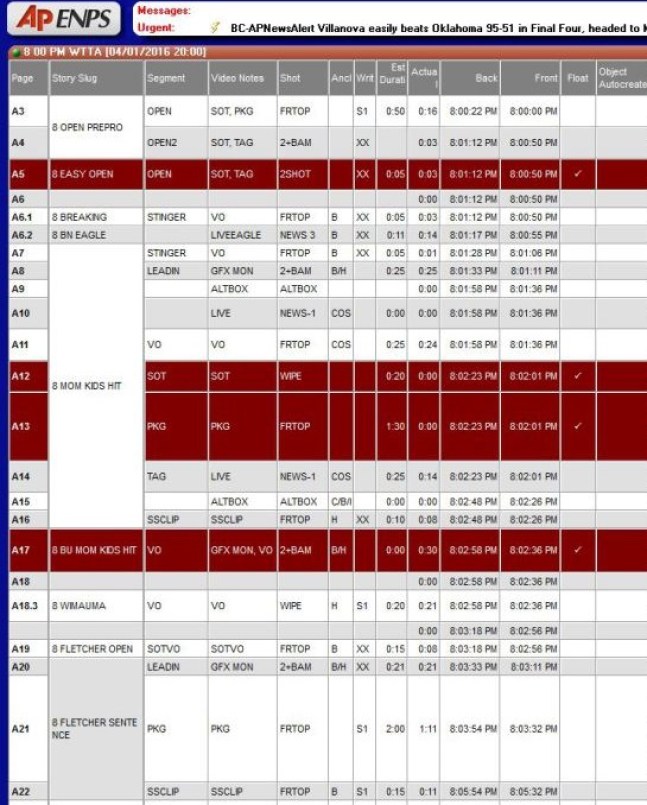
    In ENPS the red lines signify the producer floated the story. Float=skip. This means the script will not show up in the teleprompter, the video and graphics will not be queued in the automation system Ignite.

    A producer chooses to float stories for different reasons:

    1. To cut time from the show. Floating a story will help if a show is over or heavy. A show gets heavy when:
      • too many stories are added
      • anchors/reporters/meteorologists adlib for too long
      • another program leading into your show goes long (this usually happens during sporting or live events)
    2. To keep backups in the rundown and readily available in case of an emergency like a live shot failing, or a reporter not making it in time.

    What TV News Looks Like To Viewers

    Here’s an example of an A-block I produced for News Channel 8 at 8 on Great 38. This is what viewers see:

    How It’s Made

    Here’s the ENPS rundown that shows how I formatted the A-block to communicate what I wanted the show to look like with my editors, floor director, technical director, director, anchors, reporters and camera operator:

    4.1 CROPPED 1.jpg4-1-cropped-2

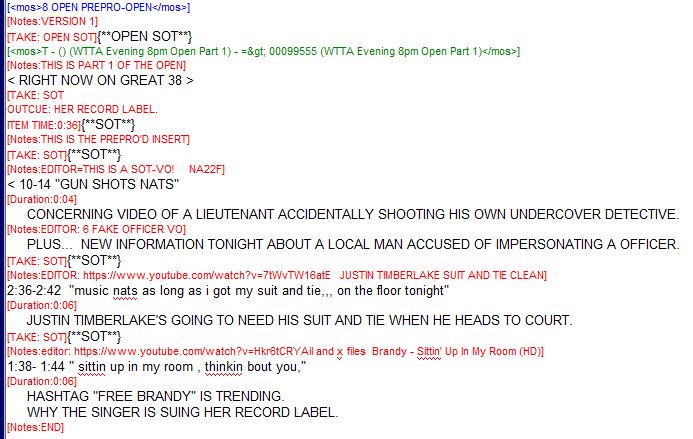
     Open Script

    open


    Here’s another example of a show I produced. Watch the newscast and follow along with the rundown to better understand formatting.

    NOTE: the yellow highlights on break 3 and final weather represent the timing bar. Since my show was an hour, it’s broken up into two separate half-hour rundowns. The producer hits the space bar and the yellow timing bar moves through each page in the rundown to help time the show.

    cropped-hurricane-matthew-rundown-1cropped-hurricane-matthew-rundown-2cropped-hurricane-matthew-rundown-3cropped-hurricane-matthew-rundown-4cropped-hurricane-matthew-rundown-5cropped-hurricane-matthew-rundown-6cropped-hurricane-matthew-rundown-7cropped-hurricane-matthew-rundown-8


    Here’s another example of a show I produced, notice how the show matches the rundown:

    cropped-6-3-16-rundown-1cropped-6-3-16-rundown-2FIXED THIS TIME 6.3.16 rundown 3.jpgFIXED FOR SURE 6.3.16 rundown 4.jpg
    cropped-6-3-16-rundown-5cropped-6-3-16-rundown-6cropped-6-3-16-rundown-7


    Here’s another example of a show I produced, notice how the show matches the rundown:

    How It’s Made

    NOTE: During this newscast, I move the scripts for A44-A49 into the C-block because my live shot in A23-A29 went long. Most live newscasts are rated using Nielsen boxes. These boxes record how long people watch different channels and at what time. Ratings are measured in 15-minute increments. Producers don’t want viewers changing the channel, which is why writing great teases is so important. Depending on who you work for, you may be required to start your C-block at 15-minutes or 45-minutes past the hour to improve your ratings. So, A44-A49 are in the C-block because if I would have left those scripts in the A-block, then I wouldn’t have started my C-block until 09:16:40 a.m.

    So how did I move the scripts during the live show and not mess up the newscast? I floated A44-A49 when I realized my A-block would be heavy. This caused ignite, my directors and anchors to skip those scripts smoothly. When we got into the first break, I told my directors I wanted to move  A44-A49 out of the A-block and into the C-block. Then I highlighted those lines and dragged them into the C-block. I unfloated them and told my anchor we were resurrecting the scripts from A44-A49. When you look at the estimated duration column, you can see A44-A49 is 1:40. So to adjust my overall show time, I floated/killed the traffic donut in C1-C3 that was supposed to be 1:17.

    9AM 11.01.16.PNG9AM 11.01.16 2.PNG
    9AM 11.01.16 3.PNG


    Election Night 2016

    Election coverage is notoriously the most challenging show for a producer, especially if their show is airing live as election results come in. I produced this newscast at 8 p.m. on election night in 2016 when polls were closing across the country. This meant I had to prepare for anything and everything to change, and it did.

    This newscast was unusual because we usually begin at 8 p.m. on WTTA, but on election night, we simulcasted cut-ins on WFLA. So the A-block would usually start on A1, but since we aired a cut-in in the same rundown at 7:45 p.m. my A-block begins on page A26.

    Also, note that this one-hour newscast is stacked in two half-hour rundowns because there’s so much content that the system would have a difficult time loading changes if it were in one rundown. Because of this, you will see the first half-hour ends after page D26. Underneath the black line, notice how I kept concession and victory speeches ready to go, so I could just drag them into the rundown when those occurred. Producers should always prepare breaking/election news templates under the black line so they can get them on air faster with little or no notice. This also helps directors code ahead of time so the automation system, Ignite, can adjust to changes faster.

    The second half hour was very fluid so you’ll notice I floated much of what was originally planned. I also moved a few page numbers around to adjust to the breaking news. Because of the number of last-minute speeches, I skipped a three-minute commercial break and ended up airing it at 9 p.m. to make room for the election coverage. Producers should always get permission to move breaks out of their designated hour from a supervisor since these breaks contain advertising money.

    A28 is floated just in case my pre-produced open wasn’t edited in time.

    Here’s the ENPS rundown that shows how I formatted the 2016 election show.

    123456

    789101112

    Consumer News

    I produced the 7 p.m. show that aired on WFLA 12/09/15. This show is big on consumer news so I chose a couple of blocks to showcase different ways to tell consumer stories. I put it together very quickly so there’s a lot of room for improvement. For example, there’s too much file video and would be better to use specific images.

    7p.PNG

    Police & Periscope Tease, Toss, PKG & tag

    Rundown

    periscope

    Tease

    periscope tease

    Toss/Lead

    periscope folo toss

    PKG script

    periscope pkg script

    Tag

    periscope folo tag

    Look For Opportunities To Use Sound

    Here you see a story about Adele with a nat pop in the tease SOTVO, then a longer SOT in the story airing in the C-block.

    adele nbc news source

    Rundown

    adele sotvo tz rundown

    Tease

    adele sotvo tz script

    1shot, sotvo script

    adele 1shot sotvo

    Don’t be a lazy producer

    Example of a lazy script:

    lazy producing bieber

    What’s wrong?

    • The VO is way too long.
    • File video is not necessary when new video exists.
    • It’s not new, now, next.
    • The new element is added in an on camera tag.
    • The producer was lazy by doing an on camera tag instead of showing the Instagram post
    • The script is not written to video

    How to make it better

    • New, now, next.
    • Script written to new video.
    • Video credited to fans.
    • Social media response both written and shown on air.
    • The writing is tighter/concise.

    good producing bieber

    Writing Lower Thirds

    Lower thirds are also referred to as "supers."

    Avoid some acronyms in graphics like the World Health Organization:

    ACRONYMS

    Lower Third Examples

    Tease lw3

    tease lw3rd writing

    Subject 2 line lw3

    lw3

    Name lw3

    name super

    lw3rd

    Writing to Video

    writing to video

    How This Story Was Teased

    tease producing

    tease writing

    Speed

    Speed is a crucial skill a producer must have nowadays. There is no way a producer knows 100% of the stories in their show. News producers must educate themselves on a wide range of topics quickly. The faster a producer can do this, the more time they can spend crafting their scripts and being creative.

    Tips For Producers

    • Learn how to search for things on the internet.
      • Use control+F to find keywords.
      • Use the “most recent” filter when searching for the latest information.
    • Learn how to skim a story to get the most important information at a glance.
    • Learn how to write quickly
      • You need to know what good writing is and what bad writing is.
      • The more you read other people’s scripts and watch other people’s shows the more you ingrain a gut instinct of what is good or bad.
      • Write a lot. The more you write, the faster you become.
    • Work smarter not harder.
      • Create script templates so you don’t rebuild every script from scratch.
      • Keep breaking news templates readily available and coded under your rundown so you don’t waste time formatting when trying to get breaking news on the air.
    • Watch/listen/read news before you come to work so you have an idea of what may be in your show before you get there.
      • Always keep a list of teaseable stories in your notes on your phone.
      • Find your go-to websites that you know will give you good story ideas.
      • Know what aired on your station when you weren’t there. If you work evenings, watch the morning show, or log on to the content management app (like iNews or ENPS) to go through their rundowns before you start your shift.
      • Follow your competitors on Twitter.

    Next Level

    Being a great news producer means more than putting a clean show on the air and getting all the information right without typos. Being a great producer means building your show in a way that evokes emotion and makes people want to keep watching. Two massively underutilized tools in a producer’s belt are promotions and teases.

    Promos get viewers to tune in. Teases keep them watching. Promos air during commercial breaks. Teases air during the newscast. The promotions department writes promotions. News producers write teases.

    If you haven’t already read the promos and teases lecture, do yourself a favor and head on over to the lecture to learn how to write concise, creative and specific teases.

    Promos

    Just because promotions departments are responsible for creating promos, doesn’t mean the producer should just focus on the newscast. Producers must collaborate with the promotions department so they can be better at their jobs.

    News Producers are really the only ones who can see the big picture in their show. Most promotions producers will look through a rundown halfway through the day. Depending on a producer’s workflow, a half-done rundown is rarely the best representation of how the show will turn out. Give your promotions people a hand by emailing them your most promotable stories as early as possible. Send them video and tell them how you plan to tease the story. Make sure the promos and teases compliment each other, not just repeat.

    News producers should also ask the promotions department if they’ve seen any cool stories that should be in the show. When news producers and promotions people work together it results in more effective promotions and boosts ratings.

    Teases

    If you want to be a great producer, great ratings will help you get attention from the bosses. How do you get great ratings? Teases are the most powerful element producers can use to keep viewers watching.

    Use your show open like a tease. Pre-produce your open. That means picking at least a few sound bites from your stories and having an editor cut a package showcasing three stories coming up in your show. I suggest choosing your lead story, then two other talkers. I’d tease your b-block story and deep tease a story later in your newscast. This way viewers will stick around if they know you have great stories coming up.

    Here’s an example of a pre-produced show open:

    Know when to break the rules. If you’re leading with a terror attack, then focus your entire open on that one story. I know your executive producer may not like it, but I encourage you to fight back on this one. Viewers watch your show from a very different perspective. TV news journalists often fail to see how insensitive they’re being by promoting and teasing happy stories right after devastating ones.

    Violence will likely be part of every newscast. But some acts of violence are so big they warrant more caution. Your executive producer will likely want you to stick with consistent show open music for branding. However, in this instance, please don’t hesitate to use more appropriate music. Here are two examples of when I chose not to include other stories in my open because the attacks were the only stories that mattered that day:

    When you deep tease, don’t forget to remind viewers about it in another tease, preferably the tease immediately before the story airs.

    If your boss lets you, pre-produce your teases too. Add some music and sound bites to pick up the pace and set the tone.

    Break the rules the right way. It’d be great to tease three stories in each tease, but sometimes going big on one story in a tease is more powerful. I know you’re under pressure to write super short teases so you can increase your story count. Many executive producers will give you about 10 seconds per story in a tease. But sometimes spending time in one story tease is worth the return on your investment like this:

    Ask your reporters to shoot standup teases, then produce them. This will stand out next to those monotonous and boring newscasts you’re up against in the fight for ratings. Don’t just air a standup tease by itself. Add flare like a nat pop and some b-roll with a pre-produce announcer open and close like this:

    Maps

    Don’t make this common producer error:

    murder map.png

    Maps can be incredibly helpful in telling a story like this. But if you don’t include major interstates, you’ll leave viewers concerned and confused. So is this in their neighborhood or not?

    An animated map that starts wide, then zooms in is more helpful. The zoomed in map includes major streets and interstates.

    map widemap zoom

    Show Wheels

    Another way to step it up is to adjust your show wheel. A producer (or executive producer, assistant news director, news director) will adjust a show wheel in hopes of keeping viewers watching longer.

    One show wheel adjustment I made in San Diego was to create seamless transitions from the lead-in show. Especially if your lead-in show is primetime, producers can carry over more viewers if they start their newscast immediately after the primetime show ends.

    The challenge is the commercials need to go somewhere. That means newscast breaks either need to be longer, or a producer needs to move the break to another spot in the show, creating an additional block. You must weigh these choices, but I think stealing those primetime viewers is better for evening shows than losing a few viewers during longer or more frequent breaks. This method is not as effective in morning shows.

    Here is an example of a show wheel suggestion I made at WFLA. I have to preface this with it’s my opinion. This is not necessarily right or wrong because every newscast is adjusting to different viewer habits and different lead-in and lead-out programming.

    • Instead of trying to squeeze two blocks in before my quarter hour, I made the A-block longer and kept my viewers watching through the quarter hour in a B-block. This improves my chances of getting those viewers in both quarter hour Nielsen ratings.
    • To keep viewers watching through the second break, I added a 15-second tease in the middle of the commercial break.
    • Don’t you hate when you sit through a break only for the anchors to just say goodbye? Viewers do too. If you have a good lead-out show they will stick around to watch the show that airs after your newscast, so add a break at the end of the newscast instead.

    Screen Shot 2017-11-13 at 6.36.05 AM.png

    Grabix

    Talking about Nielsen, great producers know how to interpret Grabix reports. Great producers know how to read between the lines and adjust their newscast accordingly.

    Here’s an example of one of my reports I submitted while I was producing weekend newscasts: 6pm Sunday Grabix Analysis Jeanette Abrahamsen

    Show Critiques

    If you want a producer job, you’ll likely have to write at least one show critique as part of your interview process. Here are two show critiques I wrote before I was hired at WFLA: